Symptom Guide
Why Does My Ceiling Fan Wobble?
A ceiling fan may wobble because its blades are uneven, damaged, or loose—or because the mounting system is moving. Learn which clues matter and when to stop the fan.
Short answer
What it usually means
A ceiling fan usually wobbles because the rotating blade set is uneven: a blade may be warped, damaged, at a different height or pitch, attached to a bent blade arm, or carrying a different amount of weight. Loose blade or light-kit hardware can add movement and noise. But if the canopy, downrod connection, outlet box, or ceiling attachment moves, treat that as a mounting concern rather than a simple balance problem and keep the fan off until it is evaluated.
First distinguish blade wobble from movement at the ceiling
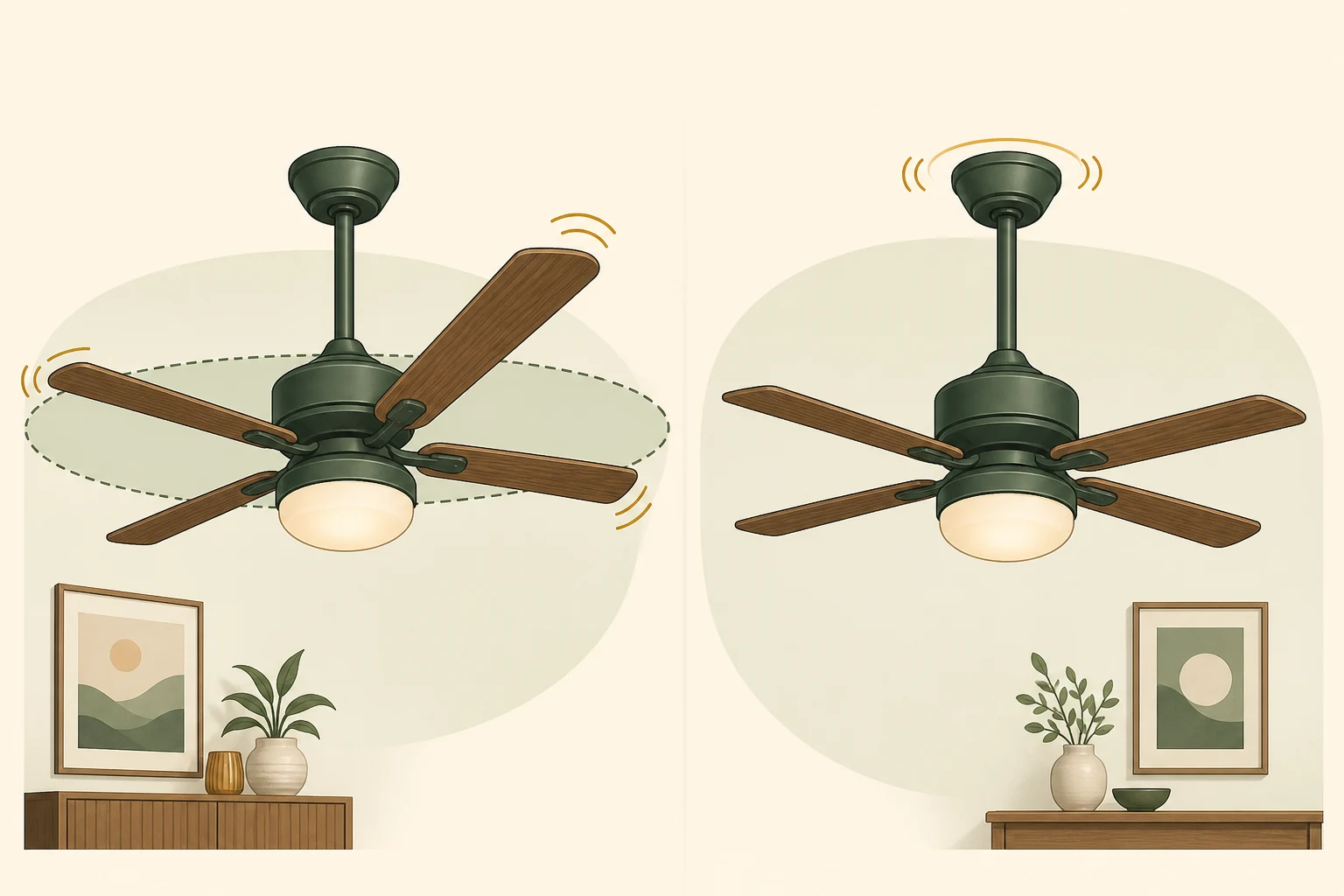
A fan can appear to shake for two fundamentally different reasons. The rotating blade plane may move from side to side while the canopy stays firm, or the fan's suspension and ceiling attachment may move. The first pattern more often fits blade alignment, condition, weight, or blade-arm problems. The second deserves more caution because the mounting bracket, downrod connection, fan-support box, or building attachment may be involved.
Watch from the floor with the area below the fan clear. If the canopy edge shifts against the ceiling, the downrod connection appears loose, or the ceiling surface flexes, switch the fan off. Do not assume a balancing weight can correct movement in the support system. Electrical codes require ceiling-suspended fans to use support identified for that purpose or an independent support arrangement; an ordinary light-fixture box is not automatically suitable for a fan's weight and motion.
| What you observe | May be more consistent with |
|---|---|
| Blade tips trace an uneven plane; canopy stays still | Uneven blade height or pitch, a bent arm, blade damage, or balance difference |
| Wobble becomes obvious mainly at high speed | A modest blade-position or weight difference amplified by speed |
| Fan wobbles at every speed | More substantial blade, arm, assembly, or mounting irregularity |
| Canopy or ceiling attachment visibly moves | Mounting bracket, downrod, support box, or structural attachment concern |
| Clicking or knocking repeats with each rotation | Loose blade or holder hardware, a component contacting another part, or a damaged rotating part |
| Wobble began suddenly | Newly loose/damaged hardware, blade damage, impact, or a mounting change rather than ordinary gradual dust accumulation |
Common reasons a ceiling fan starts wobbling
A visible wobble does not identify one failed part. The pattern, recent changes, and whether the ceiling attachment moves help separate the possibilities.
- 1The blades do not carry equal weight
A small difference in blade weight, uneven dust buildup, or a misplaced balance weight can shift the rotating center of mass. The resulting imbalance may be mild at low speed and more obvious at high speed. A model-appropriate balancing kit can address weight imbalance, but it should not be used to disguise loose mounting or a damaged blade.
- 2One blade sits at a different height or pitch
Blades are intended to follow a consistent plane and angle. A blade installed in the wrong position, unevenly seated hardware, or an arm with a different pitch can produce uneven lift and an irregular path. Measuring and adjustment procedures vary by model, so the owner's manual matters.
- 3A blade is warped or damaged
Humidity, age, impact, or material deterioration can leave a blade bowed, twisted, cracked, or drooping. A visibly damaged blade should be replaced with a compatible part rather than loaded with extra balancing weight. Do not interchange blades casually; manufacturers may supply matched sets.
- 4A blade arm is bent
The metal arm between the motor and blade can be bent or misaligned, changing blade height and pitch. Trying to bend an installed arm back by guesswork can damage the part or create a new mismatch. A qualified installer or manufacturer-approved replacement is safer when an arm is visibly distorted.
- 5Blade, light-kit, or fan-body hardware is loose
Loose blade screws can create both wobble and a rhythmic click. Other attached components may rattle or shift as the fan rotates. Hardware and tightening instructions are model-specific, and power should be disconnected according to the manufacturer before any accessible maintenance. Do not work overhead if safe ladder access is unavailable.
- 6The mounting system is moving
A loose bracket, downrod connection, canopy assembly, fan-support box, or structural attachment can let the whole fan move. That is not a blade-balance issue. Because the assembly includes electrical connections and overhead support, visible movement at the ceiling belongs with a qualified installer or electrician.
Speed, timing, and sound provide useful clues
It wobbles only at high speed
Higher speed can make a relatively small blade difference easier to see. Record the pattern, then turn the fan off before inspection. High-speed-only wobble does not prove the mount is safe, so still confirm visually that the canopy and ceiling remain stationary.
It wobbles at every speed
A large mismatch, warped blade, bent arm, loose assembly, or moving mount becomes more plausible. Persistent all-speed movement deserves a closer model-specific inspection rather than repeated operation to see whether it settles.
The wobble appeared after installation or blade work
A blade may be in the wrong position, hardware may not be seated evenly, the downrod ball may not be positioned correctly, or the support arrangement may need verification. Have the installer compare the assembly with the exact manual.
A click, knock, scrape, buzz, or flicker appears too
A repeating mechanical sound may follow a loose blade or contact between moving parts. Electrical buzzing, burning odor, flickering light, intermittent operation, or sparking is different: switch the fan off and arrange electrical evaluation rather than treating it as a balance problem.
What you can observe safely
The most useful first check is visual and can usually be done from the floor. A short video showing the canopy and blade tips together can help a technician see whether the rotating assembly or the mount is moving.
- Clear people, pets, and breakable items from beneath the fan, then turn it off and allow every blade to stop.
- From the floor, compare blade-tip height and look for one blade that droops, twists, cracks, or follows a visibly different path.
- Observe whether the canopy remains fixed against the ceiling during a brief test at the speed where wobble occurs.
- Note whether the symptom began after installation, cleaning, impact, blade removal, or a change in speed setting.
- Listen for a once-per-revolution click versus a constant electrical buzz or intermittent power symptom.
- Use the exact manufacturer manual before any model-specific balancing or hardware check, and stop if the work requires removing the canopy or accessing wiring.
When a balancing kit fits—and when it does not
A manufacturer-approved balancing kit is intended to correct small blade-weight differences after installation, blade condition, hardware, and mounting have been checked. It is not a repair for a cracked blade, bent arm, loose bracket, moving support box, or damaged downrod connection. Follow the manual for the exact fan because clip and weight placement procedures differ.
If a fan was previously smooth and suddenly develops a strong wobble, do not start by adding weight. Look for a changed condition—damage, a shifted part, loose hardware, impact, or movement at the ceiling—and keep the fan off until the cause is understood.
When to call an electrician or qualified fan installer
Arrange evaluation when the canopy or ceiling moves, the support box is not known to be fan-rated, a blade arm is bent, a blade is damaged, the fan remains strongly unbalanced after manufacturer-directed checks, or safe access is not available. A qualified fan installer can address model-specific mechanical assembly; a licensed electrician is appropriate when the support box, wiring, switch, power, buzzing, odor, flicker, or sparking may be involved.
- Keep the fan off when mounting movement, a dropping canopy, loose parts, or damaged blades are visible.
- Stop ordinary troubleshooting for burning odor, smoke, sparking, electrical crackling, or intermittent power.
- Do not stand below a running fan that knocks, sheds material, or appears ready to drop hardware.
- Provide the fan model, installation history, speed pattern, and a safe floor-level video to the professional.
Sources
- How to Fix a Wobbly Ceiling FanHunter Fan Company
- Why is my fan wobbling?Hunter Fan Support
- 2021 International Residential Code: Boxes at Fan OutletsInternational Code Council